Het lijkt erop dat u van United States komt, maar de huidige website die u wilt bezoeken is Netherlands. Wilt u van website wisselen?

- Sign In
- Info aanvragen
- Een locatie zoeken
-
Hoog contrast modus inschakelen
-
- Select language
- Africa (English)
- Afrique (Français)
- África (Português)
- África (Español)
- Argentina
- Australia
- Austria
- Azerbaijan
- Bahrain
- Belgium
- Belize
- Bolivia
- Brazil
- Bulgaria
- Canada English
- Canada Français
- Caribbean (English)
- Chile
- China
- Colombia
- Costa Rica
- Croatia
- Czech Republic
- Denmark
- Dominican Republic
- Ecuador
- El Salvador
- Europe
- Finland
- France
- Germany
- Greece
- Guatemala
- Guyana
- Honduras
- Hong Kong
- Hungary
- India
- Indonesia
- Iraq
- Ireland
- Israel
- Italy
- Japan
- Jordan
- Kazakhstan
- Korea
- Kuwait
- Lebanon
- Lithuania
- Malaysia
- Martinique
- Mexico
- Mongolia
- Netherlands
- New Zealand
- Nicaragua
- Norway
- Oman
- Panama
- Paraguay
- Peru
- Philippines
- Poland
- Portugal
- Puerto Rico
- Qatar
- Romania
- Saudi Arabia
- Singapore
- Slovakia
- Spain
- Sweden
- Taiwan
- Thailand
- Turkey
- U.A.E
- Ukraine
- United Kingdom
- United States
- Uruguay
- Uzbekistan
- Venezuela
- Vietnam
- Yemen

Hoog contrast modus inschakelen
Reducing the amount of water pumped / Adjusting motor speed
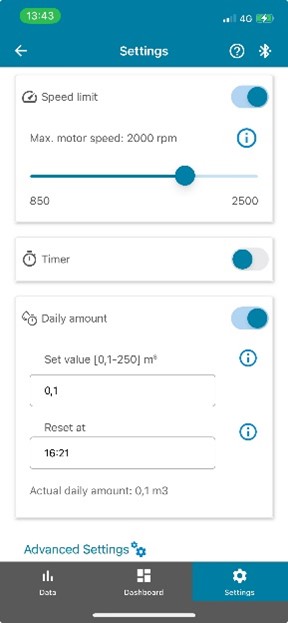
If the water flow is too high for your application, there is an easy way to limit the flow with the S-Connect app.
To lower the water flow you simply reduce the motor speed.
To do this, follow these steps:
- open the S-Connect app and select "Settings"
- turn on "Speed Limit"
- now use the slider to adjust the speed according to your needs.
Further reading
Vind producten
- Algemene voorwaarden
- Privacybeleid
- Update voorkeuren
- Copyright 2026 Xylem. All Rights Reserved.